

Download XML Copy Editor Store Edition – Free XML Editor for Windows, Text Extraction & Data Management Tool
The XML Copy Editor Store Edition is a lightweight, free, and secure XML editing tool designed for developers, data analysts, and content creators who need to manage, extract, and transform XML data efficiently. Whether you're working with structured data in software development, migrating content between systems, or simply organizing metadata, this powerful yet simple tool makes handling XML files a breeze. With support for standard XML formats, it allows users to open, view, and extract text, comments, and attributes from complex XML documents.
The software is especially useful for users of Microsoft Office XP and legacy systems, offering seamless compatibility and a user-friendly interface. After extraction, you can save the cleaned data directly into plain text files for further use in spreadsheets, databases, or documentation. The tool is ideal for anyone needing to streamline data workflows without the complexity of heavy-duty XML processors.
It’s available as a free download, with a 60-day trial and a one-time purchase option for just $10, making it an affordable solution for both personal and professional use.
Key Features of XML Copy Editor Store Edition
One of the standout strengths of the XML Copy Editor Store Edition is its ability to handle a wide range of XML file types with ease. It supports standard XML syntax, including well-formed documents, DTDs, and namespaces, ensuring compatibility with most data sources. The software allows you to open large XML files quickly, thanks to its optimized parsing engine that minimizes memory usage and loading time. A core feature is its powerful text extraction capability—you can extract only the text content, comments, or attribute values from your XML files and export them into clean, readable text files. This is particularly useful when you're converting legacy XML data into formats suitable for import into databases, spreadsheets, or content management systems.
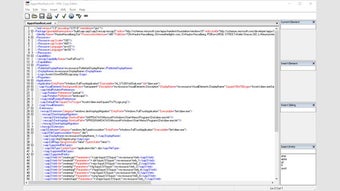
Another major advantage is the intuitive interface. The tool features a dual-pane layout: one pane displays the structured XML tree, while the other shows the raw text. This makes it easy to navigate through nested elements and locate specific data points.
The search function is robust, allowing you to find specific tags, attributes, or text strings across the entire document. Additionally, the tool includes syntax highlighting and basic validation to help identify malformed XML early, reducing errors in downstream processes. For users working with multiple versions of software or data systems, the ability to extract and compare data across different XML versions is invaluable.
Whether you're a developer managing configuration files or a content manager preparing metadata, XML Copy Editor simplifies complex tasks with minimal effort. It’s also highly secure—being a standalone application with no internet dependency, your data remains private and protected.
How to Install and Use XML Copy Editor Store Edition
Installing the XML Copy Editor Store Edition is a straightforward process, especially on Windows systems. First, visit the official download page and click the free download button. The installer file is small and fast to download, typically under 5MB.
Once downloaded, double-click the setup file to launch the installation wizard. Follow the on-screen prompts—select your preferred installation directory, accept the license agreement, and click “Install.” The wizard ensures all necessary components are properly registered, reducing the risk of errors. After installation, launch the software from your Start menu or desktop shortcut.
Upon opening, the program presents a clean interface with a file browser and two panes. To begin, click File > Open and select your XML file. The tool will parse the document instantly, displaying the hierarchical structure in the left pane.
You can expand or collapse nodes to navigate through the data. To extract content, use the Extract Text function under the Tools menu. Choose whether to extract only text, comments, attributes, or a combination.
The extracted data appears in the right pane, ready for review. You can then save the output as a plain text (.txt) file by selecting File > Save As. This exported file can be imported into Excel, Notepad, or any other application that supports text input.
For advanced users, the tool also supports command-line execution, allowing automation in batch processing workflows.
Compatibility and System Requirements
The XML Copy Editor Store Edition is specifically designed for older Windows operating systems, ensuring excellent compatibility with Windows 2000, Windows XP, and Windows Server 2003. This makes it a reliable choice for users still working with legacy environments, especially in corporate or government sectors where system upgrades are slow. While it’s not officially supported on newer systems like Windows 10 or 11, many users have successfully run it via compatibility mode or virtual machines. For Mac users, the software is not natively available, but it can be run using cross-platform tools like Wine or through a Windows VM.
Despite its age, the tool remains lightweight and efficient, requiring minimal system resources. It runs smoothly on machines with as little as 256MB of RAM and a 1GHz processor. The software does not require administrator rights for installation, making it ideal for shared or restricted environments.
It’s also completely portable—after installation, you can copy the entire folder to a USB drive and run it from any Windows machine without leaving traces. This portability is a significant advantage for IT professionals and consultants who need to work on multiple systems. The tool is free to use, with a 60-day trial period that unlocks all features.
After the trial, you can purchase the full version for just $10, which removes the time limit and provides lifetime access to updates.
Pros and Cons: Is XML Copy Editor Right for You?
- Pros:
- Free download with full functionality during 60-day trial
- Lightweight and fast, even with large XML files
- Efficient text, comment, and attribute extraction
- Simple, intuitive interface ideal for non-developers
- Secure and offline—no data sent to servers
- Portable version available for USB use
- Excellent compatibility with Windows XP and legacy systems
- Cons:
- Not compatible with Windows 10/11 or macOS natively
- Limited to XML editing and extraction—no advanced transformation tools
- No built-in XML validation beyond basic syntax checks
- Outdated UI compared to modern software
- Only one-time purchase; no subscription model
Frequently Asked Questions (FAQ)
-
Is XML Copy Editor Store Edition free to download?
Yes, the XML Copy Editor Store Edition is completely free to download and use for a 60-day trial period. After the trial, you can purchase the full version for just $10, which grants lifetime access to all features.
-
Can I use XML Copy Editor on Windows 10 or 11?
While the software is officially designed for Windows 2000, XP, and 2003, many users have successfully run it on Windows 10 and 11 using compatibility mode or virtual machines. However, official support is not provided for newer systems.
-
Does XML Copy Editor support XML validation?
The tool provides basic syntax validation to detect malformed XML. However, it does not support advanced validation using DTDs or XML Schema definitions. For more robust validation, consider pairing it with other tools.
-
Can I extract attributes and comments from XML files?
Yes, one of the core features is the ability to extract text, comments, and attribute values separately. You can choose which data to include during the export process and save it as a plain text file.
-
Is the software secure for handling sensitive data?
Absolutely. XML Copy Editor runs locally and does not require internet access. Your XML files remain on your device at all times, ensuring maximum privacy and security—ideal for handling confidential or regulated data.
Final Verdict: A Reliable Tool for XML Data Handling
If you're working with XML files on legacy Windows systems or need a no-frills tool for extracting text and metadata, the XML Copy Editor Store Edition is an excellent choice. Its simplicity, speed, and low resource usage make it ideal for quick data extraction tasks. While it lacks modern features like syntax highlighting in some versions or support for newer OS platforms, its core functionality remains highly effective. The $10 purchase price is a small investment for a tool that can save hours of manual data processing. Whether you're a developer, data analyst, or content manager, this software offers real value.
For users still on Windows XP or in environments where software updates are restricted, this tool is a must-have. Even on modern systems, it can be run via compatibility settings or virtualization. We highly recommend downloading the free version to test its capabilities. Don’t miss out on this reliable, secure, and affordable XML editing solution—download XML Copy Editor Store Edition today and streamline your data workflow.







